 |
 |
 |
 |
 |
 |
 |
 |
 |
 Freddy Pharkas, Frontier Pharmacist was designed to
run on DOS, Windows 3.x, and Macintosh. Game programming was much different
back then, and it takes a little effort to get it running on modern
operating systems, such as Windows 11.
Freddy Pharkas, Frontier Pharmacist was designed to
run on DOS, Windows 3.x, and Macintosh. Game programming was much different
back then, and it takes a little effort to get it running on modern
operating systems, such as Windows 11.First of all, if you don't even have the game, there are several free demos available. You can download them from the Links page. Unlike many adventure games, these demos are not just the first part of the actual game. They're set in the same town, but they've got different puzzles. They're not very hard, and no one should have much trouble with them. Please note that since they do contain different puzzles, even people with the whole game might want to download them just for fun.
After you try the demo, if you find you'd like to buy the whole game, you have a few options to try. The easiest method is to buy it from GOG.com. If you're looking for an original copy of the game, you could try to find a reseller on the internet (such as Amazon.com), but most are out of stock, with no way of getting more software. Your best bet is to go to an auction site (such as eBay) and search for "Freddy Pharkas". There are often a few copies of the game available for auction. You'll also find that there are two versions of the game: 3.5" floppies or a CD-ROM. I'd recommend the CD-ROM version, since you get full speech from all the characters. However, the only CD-ROM versions I've seen on eBay lately are the Sierra Originals rereleased versions, which don't come with the game's complete manual. If you need a manual, check out the Links page. Please note that it is your responsibility to make sure everything you need to play the game is there before you bid.
Unfortunately, modern operating systems such as Windows 11 no longer support running 16-bit programs such as this game. So, getting it running can be a bit of a challenge. If you insist on running the Windows version, your only option might be to set up a virtual machine of an older version of Windows that doesn't have this restriction (32-bit Windows XP works pretty well). However, if you're willing to run the DOS version, there's a relatively simple way to get things working: DOSBox. It's a DOS emulator that has been successful in running FPFP, and it has been ported to many platforms, such as Windows, Linux, and macOS. Thanks go to Paul for pointing this out to me. After you have DOSBox installed, it's a good idea to make a directory like c:\dosbox so that DOSBox doesn't have access to your entire hard drive. Then, run DOSBox, and type the following commands to start the game installing (assuming C: is your hard drive and D: is your CD-ROM drive):
Once it's installed, you can run it with the following commands (you can put these at the end of the DOSBox options configuration file to save time in the future):mount c c:\dosbox mount d d:\ d: install
mount c c:\dosbox
mount d d:\
c:
sierra\fpfpcd
 Once you're actually playing the game, it plays much like any adventure game made today. There are different mouse cursors, each representing different actions. A boot represents walking, a pair of eyeglasses allow you to look at people or objects, a hand allows you to pick up or manipulate things and open doors, and a speech bubble allows you to talk to other people. There is an inventory which holds all the items you currently have, and they each form their own mouse cursor, which you can use to give people inventory items or use the items on other objects. You can go pretty much anywhere in the town from the start of the game. The following is a map of the basic game area: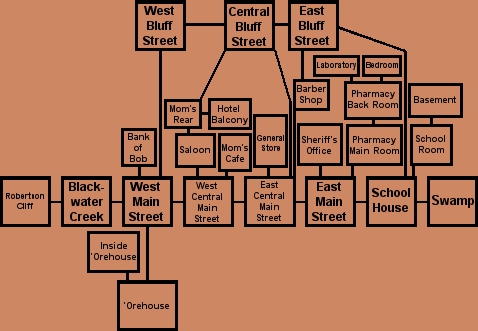
If you're new to adventure games, there are a few rules you should know. First and foremost, to take a quote from the Leisure Suit Larry series, save early and save often! This game actually has an advantage over some Leisure Suit Larry games. In some of the Larry games, you could save at a point where winning was impossible. Maybe you used an item in the wrong place, maybe you never got a key item, etc. It is possible to die in Freddy Pharkas, unlike adventures like The Curse of Monkey Island, but saving often ensures you won't lose too much when you do. The other key piece of advice is to look at, talk to, touch, and use every item on everything and everyone when you're stuck. Sure, doing one thing might kill you. But, doing something surprisingly similar might help you. You never know how weird the minds of the game designers are until you've finished the game.
As a final note, I often get asked whether or not the CD-ROM version of the game has the ability to display the text that the floppy version displays, while at the same time playing its normal speech. I haven't tried it, but someone has supposedly come up with a way. Click here to see the instructions.
Copyright © 2000-2024 by Andrew Zitnay. All images are copyright © 1993-1995 by Sierra On-Line, Inc.